It's 2 AM on a Saturday, and your phone buzzes. The app is down. After three hours of debugging, you finally discover the issue: someone changed `userId` to `authorId` in the backend last week. Your frontend was still looking for `userId`. Everything compiled without errors, and TypeScript showed green checkmarks all around. Does this sound familiar?
This blog aims to ensure that this kind of problem never happens again by establishing true end-to-end type safety.
What you'll learn
By the end of this guide, you'll be able to:
- Understand why manual types can lead to significant issues
- Set up a GraphQL API that automatically generates types
- Link your React frontend seamlessly with your backend, avoiding type mismatches
- Identify breaking changes before they affect your users
- Ship code with confidence (and enjoy a good night's sleep)
The problem: your types live on two islands
Imagine your backend and frontend as two separate islands, each with its own TypeScript ecosystem. Both define a type, and both feel secure in their type-safety. However, they're divided by an ocean, with no shared source of truth. A small change on one island can silently break the other.
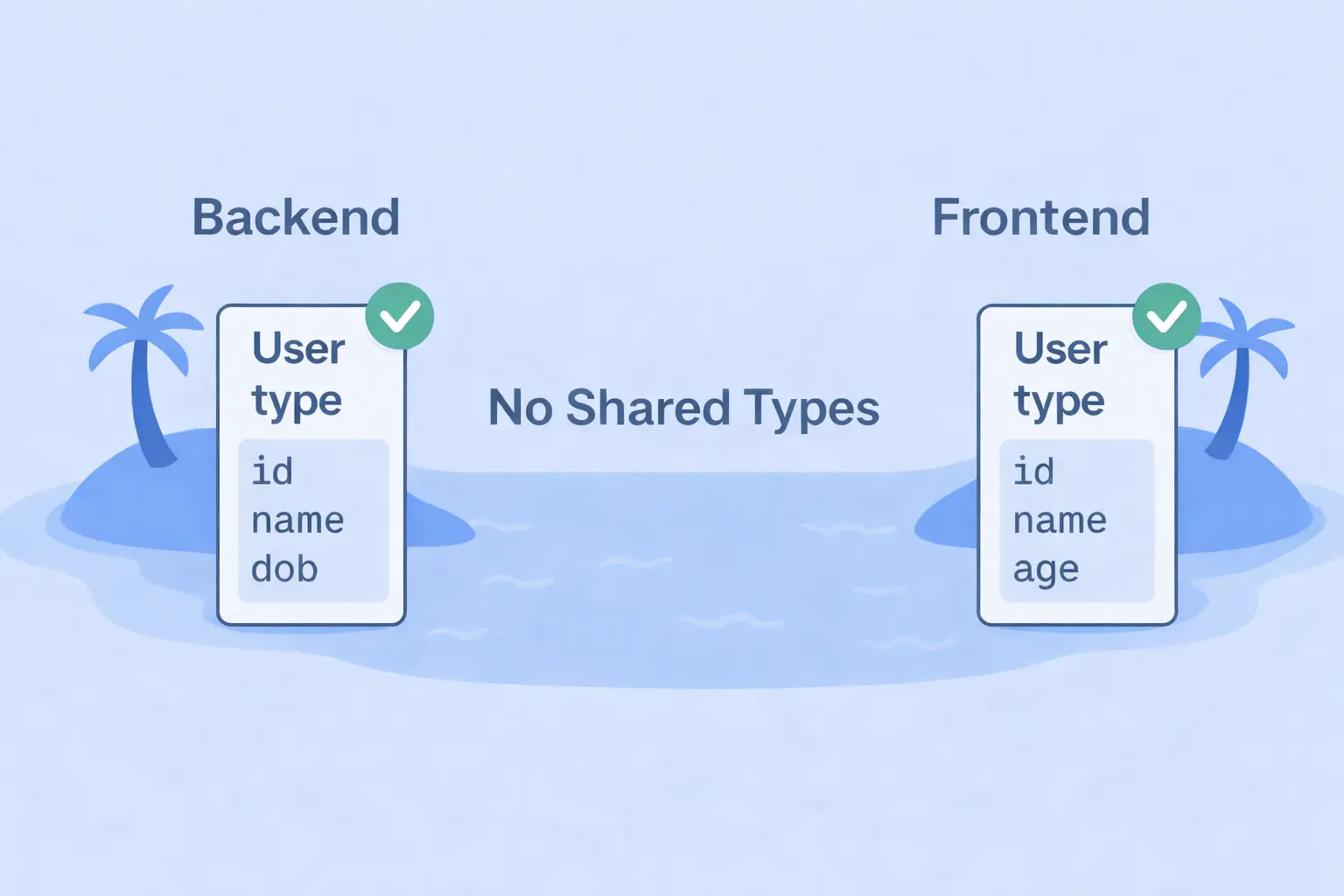
Both the backend and frontend define their own version of the User type.
They look identical, and everything compiles perfectly.
TypeScript shows all green, life is good.
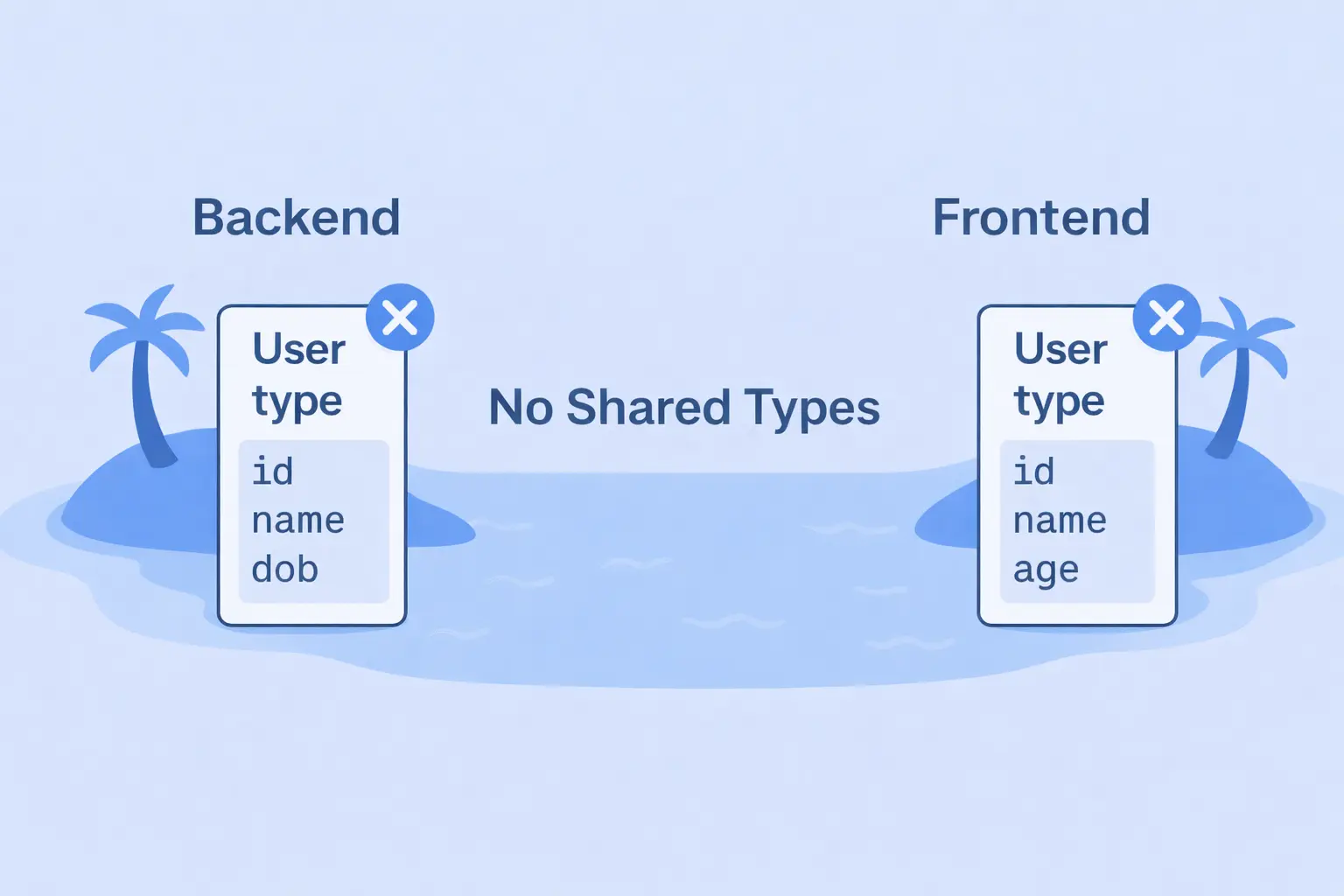
The backend team updates the User to store dob instead of age. Everything compiles fine because TypeScript checks each island separately, and the change goes unnoticed. Both sides are “type safe,” yet your data silently drifted apart.
Monday morning, the support inbox lights up: "Why doesn't the app show user ages anymore?" This is the fundamental problem that end-to-end type safety solves. No more islands. No more silent mismatches.
The solution: one Schema to rule them all
So, how do we stop our backend and frontend from becoming disconnected?
Simple, we need to ensure they communicate effectively, and make them speak the same language. That language is your GraphQL schema, the single source of truth for your entire app.
The Flow: End-to-End Type Safety
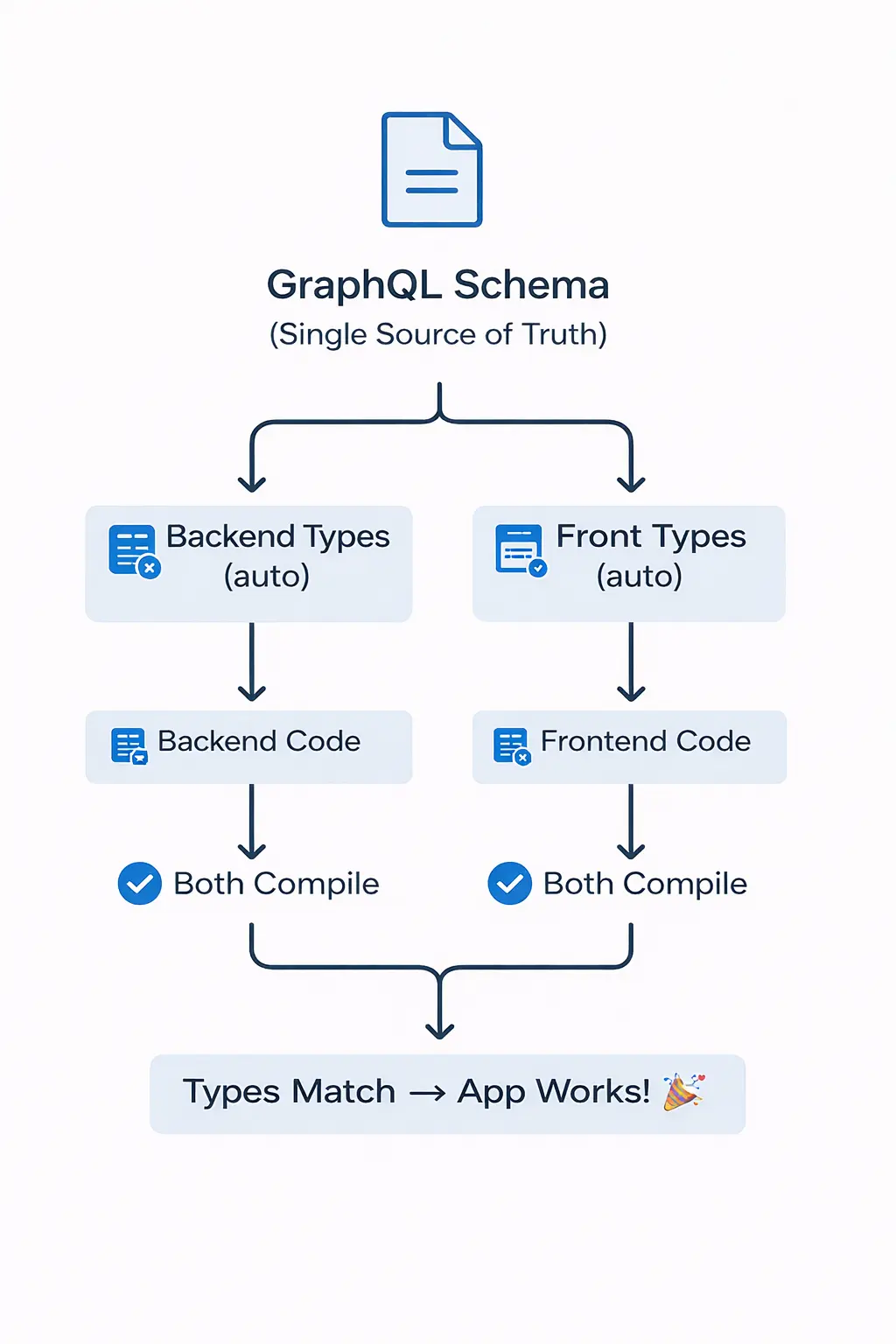
Every type, field, and structure in your application is defined a single time in the schema, which then automatically generates the corresponding types for both the backend and frontend. This eliminates duplicate definitions and the uncertainty of whether they align.
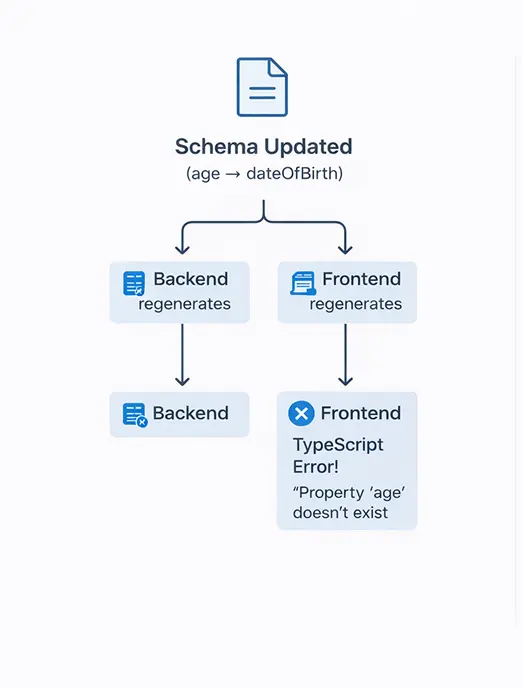
Now the mismatch is caught instantly during compile time, not at 2 AM on Saturday. Your schema drives your code, your code drives your app, and your types stay in sync effortlessly.
From Schema to Codegen
Now that we understand how the GraphQL schema acts as the single source of truth, the next question is — how do we actually achieve end-to-end type safety?
The answer is GraphQL Code Generator (or Codegen for short).
Codegen is a tool that reads your schema and queries, then automatically generates TypeScript types and React hooks for you.
No more writing types by hand or worrying if your frontend and backend have drifted apart — Codegen ensures every part of your stack speaks the same language.
Let’s add this to your project
Now that we know what Codegen does, let’s bring it into your workflow.
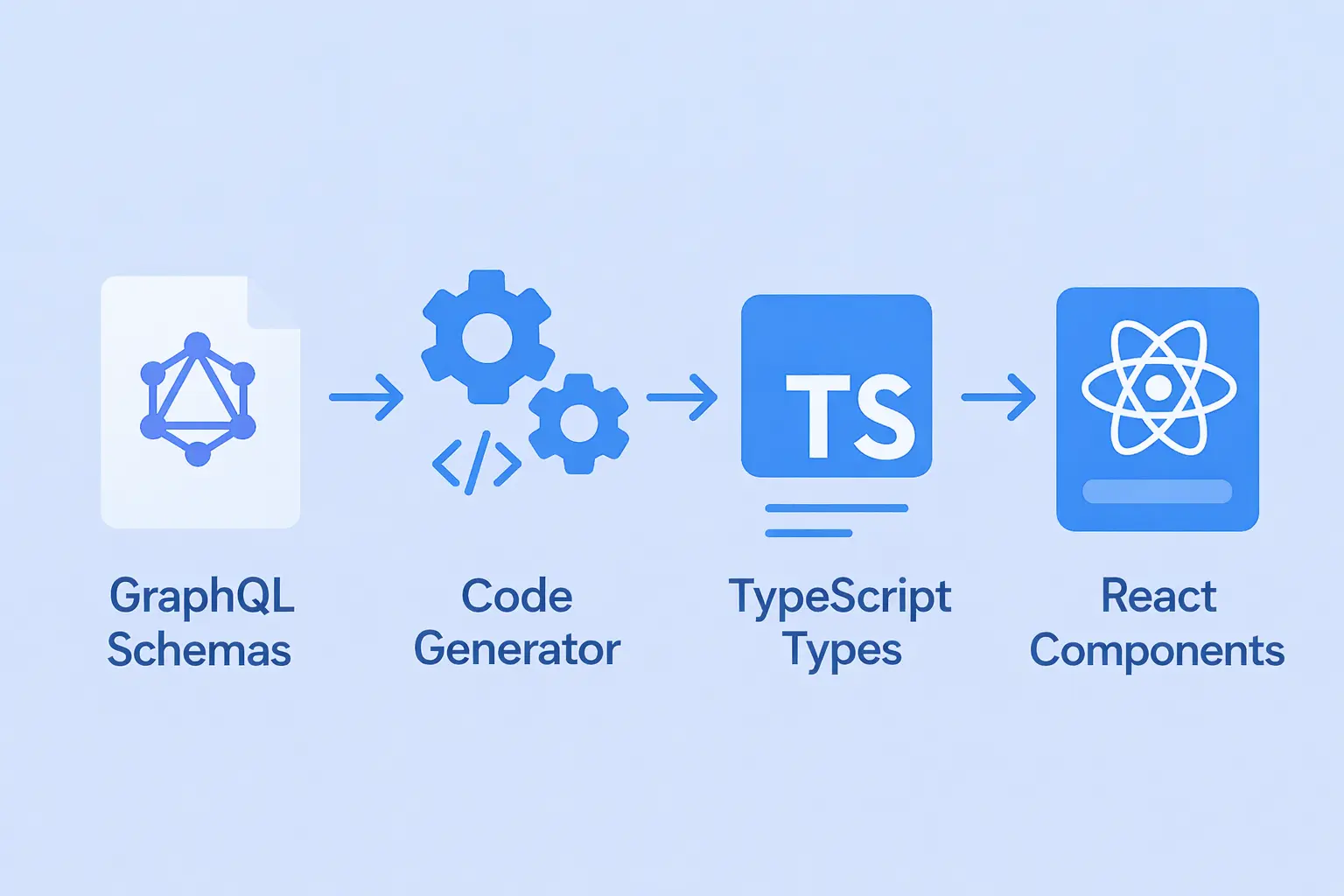
What you’ll do
- Configure Codegen to point to your GraphQL schema
- Write your queries in .graphql files (or inline with gql)
- Run npm run codegen → get typed hooks instantly
- Get instant results:
- Queries match the schema → fully typed hooks generated
- Queries don't match → compile-time error before production
Once configured, Codegen runs in two places:
- Backend: Generates resolver types from your schema
- Frontend: Validates queries and generates typed React hooks. Use those hooks in your React components with full autocomplete and type safety
Let's see it step by step in action.
Step 0: Quick Backend Setup (If needed)
Already have a GraphQL server? Skip to Step 1.
Need one fast? Here's a minimal Apollo Server with a `schema.graphql` file:
npm install @apollo/server graphql
npm install --save-dev @graphql-codegen/cli @graphql-codegen/typescript @graphql-codegen/typescript-resolvers
Note: startStandaloneServer is designed for prototyping and simple use cases — for production, integrate Apollo Server with Express
Create a `schema.graphql` file with:
type Todo {
  id: ID!
  text: String!
  done: Boolean!
}

type Query {
  todos: [Todo!]!
}
Create `server.ts`:
import { ApolloServer } from '@apollo/server';
import { startStandaloneServer } from '@apollo/server/standalone';
import fs from 'fs';
import path from 'path';

const typeDefs = fs.readFileSync(path.join(__dirname, 'schema.graphql'), 'utf-8');

const todos = [
  { id: '1', text: 'Learn GraphQL', done: false },
  { id: '2', text: 'Build a Todo app', done: true },
];

const resolvers = {
  Query: {
    todos: () => todos,
  },
};

const server = new ApolloServer({ typeDefs, resolvers });
const { url } = await startStandaloneServer(server, { listen: { port: 4000 } });

console.log(`🚀 Server ready at ${url}`);
Run the backend server:
npx tsx server.ts
Backend Types? Generate Them
Create `backend/codegen.ts`:
import type { CodegenConfig } from '@graphql-codegen/cli';

const config: CodegenConfig = {
  schema: './schema.graphql',
  generates: {
    './src/generated/graphql.ts': {
      plugins: ['typescript', 'typescript-resolvers'],
    },
  },
};

export default config;
Run backend codegen on schema changes:
npm run codegenStep 1: Frontend Setup with Codegen and Apollo Client
Now lets move forward, In frontend project run:
npm install --save-dev @graphql-codegen/cli \
  @graphql-codegen/typescript \
  @graphql-codegen/typescript-operations \
  @graphql-codegen/typescript-react-apollo

npm install @apollo/client graphql
Create `codegen.ts`:
import type { CodegenConfig } from '@graphql-codegen/cli';

const config: CodegenConfig = {
  schema: 'http://localhost:4000/graphql',
  documents: ['src/**/*.{ts,tsx,graphql}'],
  generates: {
    './src/generated/graphql.ts': {
      plugins: [
        'typescript',
        'typescript-operations',
        'typescript-react-apollo',
      ],
      config: { withHooks: true },
    },
  },
};

export default config;
Add these scripts in `package.json`:
"scripts": {
  "codegen": "graphql-codegen",
  "codegen:watch": "graphql-codegen --watch"
}
Note: Watch mode requires @parcel/watcher as an additional dev dependency — run npm install --save-dev @parcel/watcher once.
Step 2: Write your query
Create a query file, e.g. `src/queries/getTodos.graphql`:
query GetTodos {
  todos {
    id
    text
    done
  }
}
Step 3: Generate types & hooks
Run:
npm run codegen
Generated hooks like `useGetTodosQuery` will be created in `./src/generated/graphql.ts`.
Step 4: Use hook in React
import { useGetTodosQuery } from '../generated/graphql';

export function TodoList() {
  const { data, loading, error } = useGetTodosQuery();

  if (loading) return <div>Loading...</div>;
  if (error) return <div>Error: {error.message}</div>;

  return (
    <ul>
      {data?.todos.map(todo => (
        <li key={todo.id}>
          <input type="checkbox" checked={todo.done} readOnly />
          {todo.text}
        </li>
      ))}
    </ul>
  );
}
At This Point
- Backend and frontend share a single source of truth schema.
- Backend resolvers use type-safe typings.
- Frontend queries and hooks are fully typed.
- Any schema changes propagate type errors during development, preventing runtime bugs.
Wrapping it up: One Schema, One Language
You’ve just seen how a single GraphQL schema can power your entire app, backend to frontend, while maintaining type safety throughout the process.
Let’s recap what we built:
GraphQL Schema → Codegen → TypeScript Types + React Hooks → React Components
Each layer communicates in the same language, automatically—fewer duplicated types, mismatched field names, and runtime 'undefined' errors."
What you gained
- Single Source of Truth: Your GraphQL schema defines the contract once.
- Minimal Drift: Backend and frontend types stay aligned as long as you re-run Codegen after schema changes.
- Faster Dev Flow: Autocomplete, type hints, and compile-time safety everywhere.
Final thought
End-to-end type safety isn’t just about preventing bugs—it’s about building trust between every part of your stack. When your schema defines the truth, your entire stack aligns.