
Stop drowning in legacy code. Start understanding it
If you've ever inherited a Drupal project with 50+ custom modules, zero documentation, and a deadline breathing down your neck, you know the feeling. That pit in your stomach when someone asks, "How long will this take?" and you genuinely have no idea because you haven't even figured out which modules talk to each other yet.
I've been there. After nearly 9 years of building and maintaining Drupal applications, I've lost count of how many hours I've spent manually tracing function calls, hunting for security vulnerabilities buried in legacy code, and trying to explain architectural complexity to non-technical stakeholders using nothing but hand-waving and whiteboard diagrams that made sense to absolutely no one.
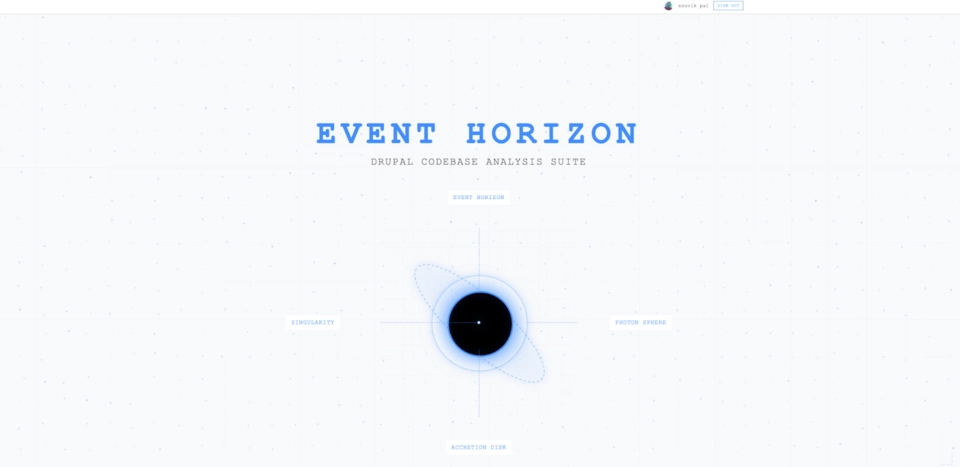
So I built EventHorizon.
The problem nobody talks about
Here's the dirty secret of large-scale projects: understanding code takes longer than writing it.
When you join a new project or pick up a client's existing site, you're not just reading code. You're doing archaeology. You're tracing dependencies across dozens of modules. You're searching for performance bottlenecks that might be lurking in some forgotten hook implementation. You're praying that whoever wrote custom_module_form_alter actually knew what they were doing with user input sanitisation.
The traditional approach looks something like this:
- Open a module file
- Grep for function names
- Open another file
- Lose track of where you started
- Draw something on a whiteboard
- Repeat for 3 days straight
- Still not confident you understand the whole picture
This isn't just inefficient. It's dangerous. When you don't fully understand a codebase, you miss security vulnerabilities. You introduce performance regressions. You break things that seem unrelated. And worst of all, you give inaccurate estimates to clients because you're essentially guessing at complexity.
What EventHorizon actually does
EventHorizon is a comprehensive static analysis and visualisation platform built specifically for Drupal 8, 9, 10, and 11 projects. But calling it a "static analyser" is like calling a smartphone a "calculator that makes calls." It does so much more.
At its core, EventHorizon:
- Visualises your entire module architecture as an interactive, force-directed dependency graph
- Automatically scans for performance anti-patterns and security vulnerabilities
- Analyses Drupal-specific caching implementations with actionable recommendations
- Validates your configuration structure and identifies orphaned entities, broken references, and circular dependencies
- Provides AI-powered insights through a context-aware chatbot that actually understands your specific codebase
- Generates exportable reports in CSV and Excel formats for stakeholder communication
And here's the thing that makes it actually usable: you don't need to configure anything complicated or install dependencies on your Drupal site. Just upload a ZIP file of your codebase and let EventHorizon do its thing.
Getting projects into EventHorizon
One of my biggest frustrations with existing code analysis tools is the setup process. Half the time, you spend more effort configuring the tool than actually using it.EventHorizon takes a different approach. You upload your Drupal project as a ZIP file through a simple web interface. That's it.
The upload process
- On the homepage, click on the upload button
- In the pop-up that follows:
- Fill in the project name (whatever you want to call it),
- Enable/Disable the checkbox that asks if the project is AI-compliant. (Note: even if you choose to keep the AI features disabled, you would be able to do the complete static analysis of the project with all the available tools)
- Browse and select your ZIP file and click Upload
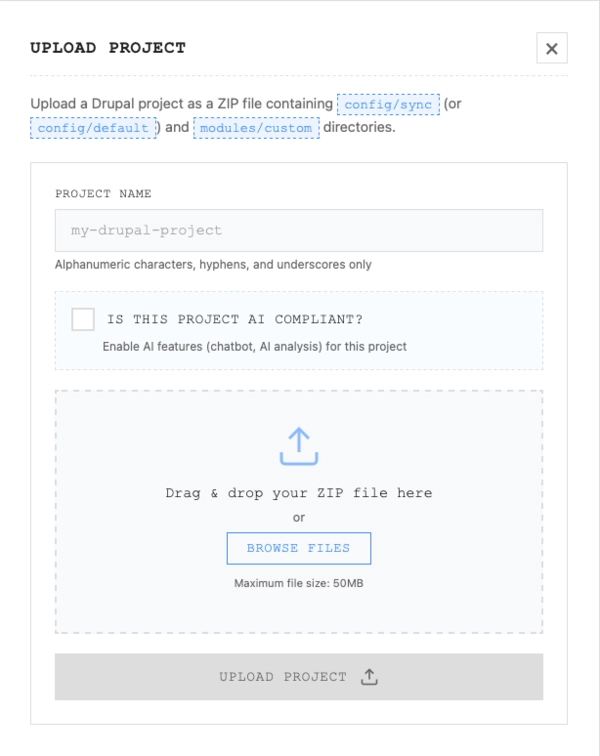
The system automatically extracts your codebase, configures the analysis paths, and makes your project available for analysis immediately. No Docker restarts. No config file editing. No command-line wizardry.
What to include in your ZIP
Required:
- The zip should include the following folder structure:
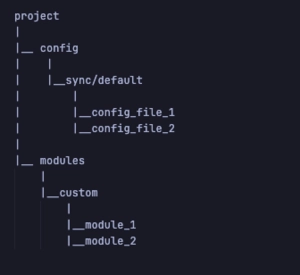
- Nothing else is required.
The AI compliance checkbox (and why it matters)
Here's something I'm particularly proud of: EventHorizon respects your data privacy requirements.
When you upload a project, you'll see a checkbox labelled "Is this project AI compliant?"
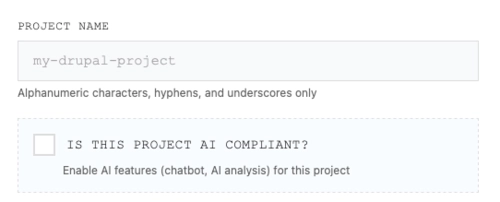
If you check this box, only then EventHorizon will:
- Index your codebase for RAG (Retrieval Augmented Generation)
- Enable the AI chatbot with context-aware responses about your specific code
- Allow AI-powered best practices analysis
If you leave it unchecked, EventHorizon will:
- Run all static analysis features (performance, security, caching, configuration)
- Generate all visualisations and reports
- Never send your code to any AI/LLM service
This matters because not every project allows sending code to third-party AI services. Some clients have strict data handling requirements. Some codebases contain proprietary business logic that shouldn't leave your infrastructure. EventHorizon handles both scenarios without compromising on functionality.
You get the full power of automated static analysis regardless of AI compliance status. The AI features are an enhancement, not a requirement.
The complete feature breakdown
Let me walk you through every tool EventHorizon provides. Each of these would typically require a separate tool or hours of manual work.
1. Project dashboard
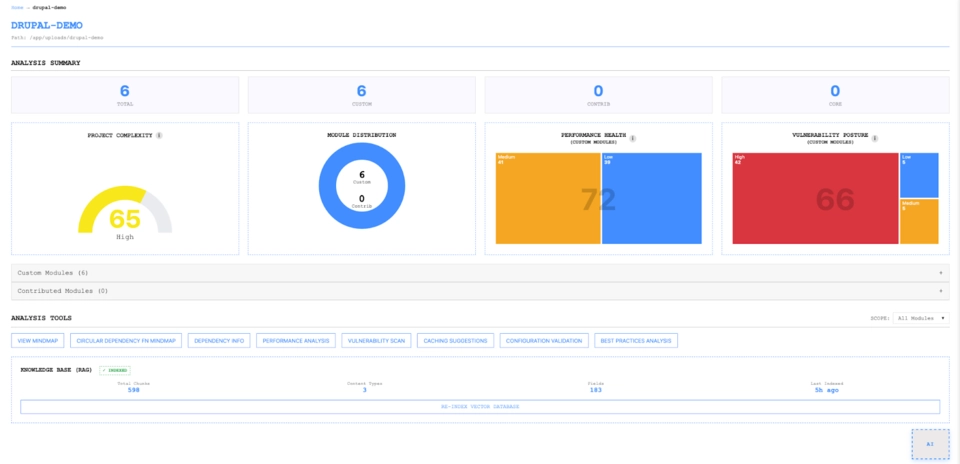
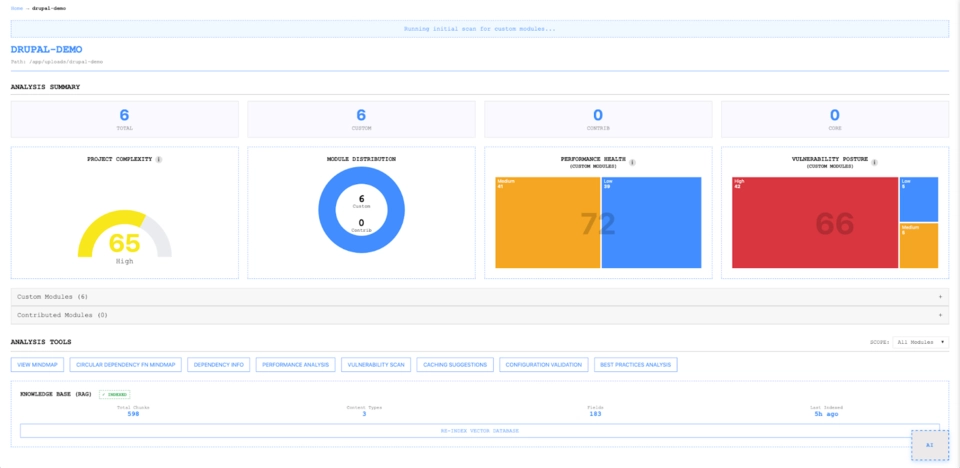
The dashboard is your command centre. At a glance, you see:
KPI cards:
- Total Modules: Breakdown by custom, contrib
- Performance Health Score: 0-100, calculated using a penalty-based system (High severity: 10 points, Medium: 3, Low: 1)
- Vulnerability Health Score: Same calculation, focused on security issues
- Complexity Score: Based on connections, services, functions, and hook diversity
Visual analytics:
- Performance Health Treemap (issues visualised by module)
- Vulnerability Posture Treemap
- Module Distribution Chart
The scoring system is designed to be actionable. A score of 85+ means you're in good shape. 70-84 means some attention is needed. Below 70? Time to prioritise cleanup.
2. Interactive dependency mindmap
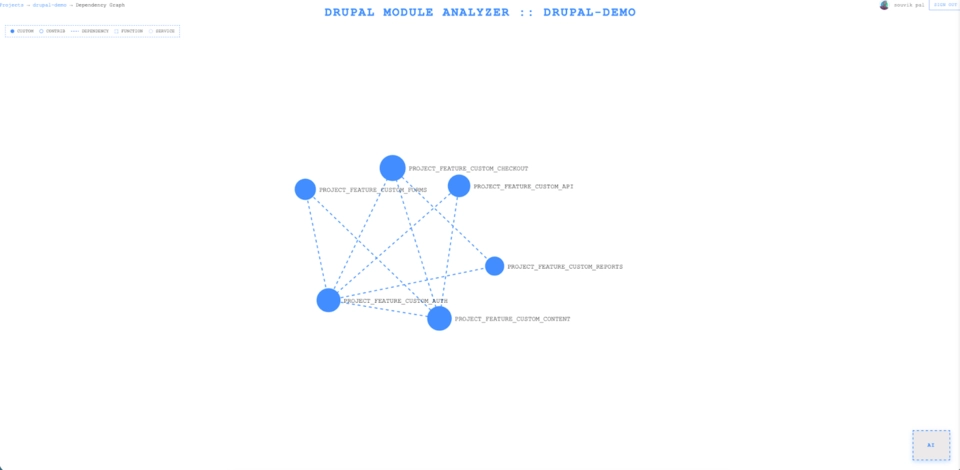
This is the feature that makes architecture discussions actually productive.
The mindmap is a force-directed graph where:
- Nodes represent modules (sized by complexity)
- Edges represent dependencies (styled by connection type)
- Colours indicate module type: Custom (green), Contrib (blue), Core (gray)
Three visualisation modes:
Module view: See how modules interconnect. Identify those highly-coupled modules that everyone's afraid to touch.
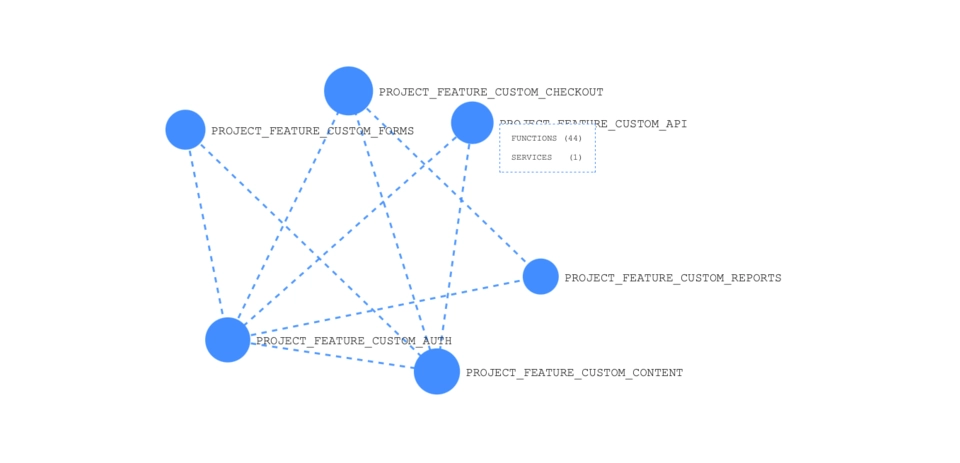
Function view: Drill down to function-level dependencies. See which functions call which across module boundaries.
Service view: Visualise dependency injection patterns. Understand how your services wire together.
Interactive controls:
- Search for specific modules or functions
- Zoom and pan
- Drag nodes to reposition
- Filter by module type
- Click nodes for detailed metadata
I can't tell you how many times this mindmap has saved hours of explanation. Instead of describing architecture in a meeting, I just share my screen and let people explore.
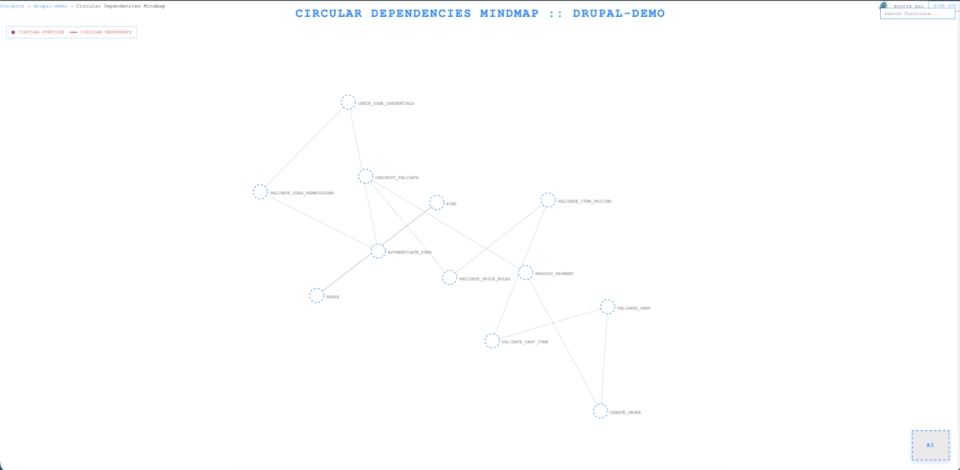
3. Circular dependency function mindmap
Circular dependencies are the silent killers of maintainability. When function A calls B, B calls C, and C calls A, you've created a cycle that makes testing nearly impossible and refactoring terrifying.
EventHorizon automatically detects these cycles and visualises them:
Severity Levels:
- Low: 2-3 functions in cycle (minor concern)
- Medium: 4-6 functions (moderate technical debt)
- High: 7+ functions (critical refactoring target)
The visualisation groups functions by their parent modules, so you can immediately see if the cycle is internal to a module or spans multiple modules (which is worse).
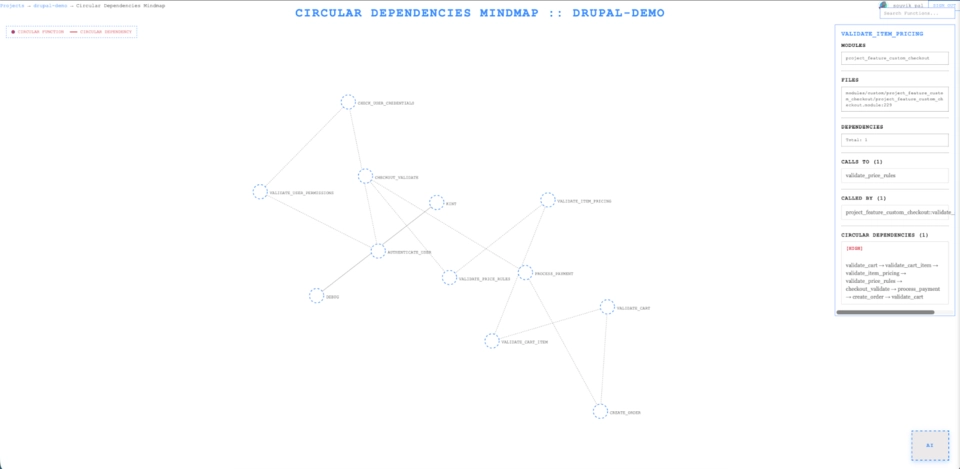
This feature alone has helped me identify refactoring opportunities that would have taken days to find manually.
4. Dependency info page
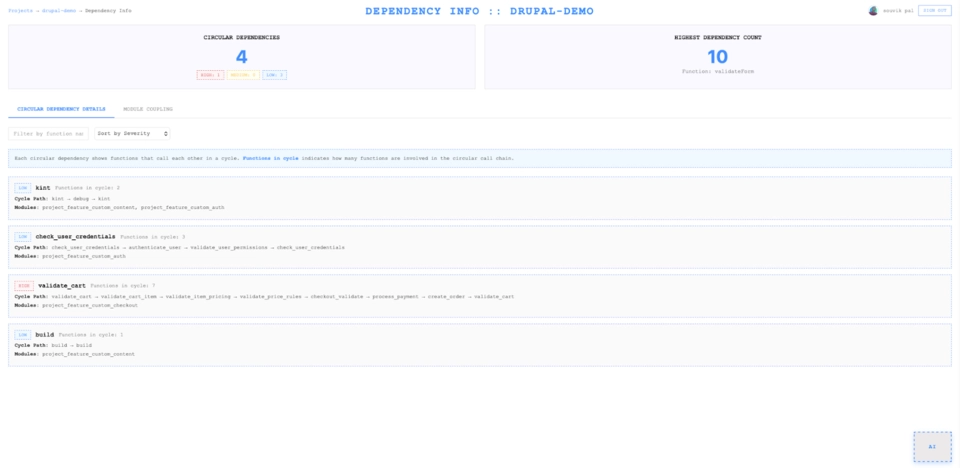
The Dependency Info page gives you hard numbers on module coupling:
Summary metrics:
- Total circular dependencies
- Severity breakdown
- Function with most dependencies
- Most coupled modules
Per-module metrics:
- Outgoing function calls (cross-module)
- Incoming function calls
- Total dependencies
- Coupling score (0-100)
- Circular dependency count
Coupling score interpretation:
- 0-20: Loosely coupled (excellent)
- 21-50: Moderate coupling (good)
- 51-80: Highly coupled (concerning)
- 81-100: Extremely coupled (needs immediate attention)
When I'm planning a refactoring sprint, this page tells me exactly where to focus and gives me measurable targets.
5. Performance analysis
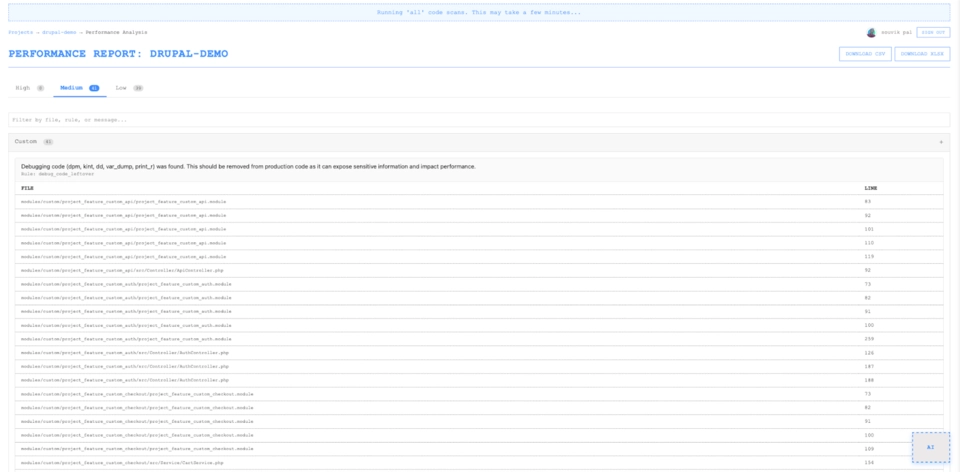
EventHorizon scans your codebase for performance anti-patterns using pattern-based detection:
What it catches:
- N+1 query patterns
- Uncached database queries
- Missing query tags
- Inefficient entity loading
- Debug code left in production
- Heavy computation in hooks
- Slow file operations
Report structure:
- Issues grouped by severity (High/Medium/Low)
- File paths with exact line numbers
- Issue counts per pattern
- Expandable details for each finding
You can export to CSV or Excel for sprint planning.
6. Vulnerability scan
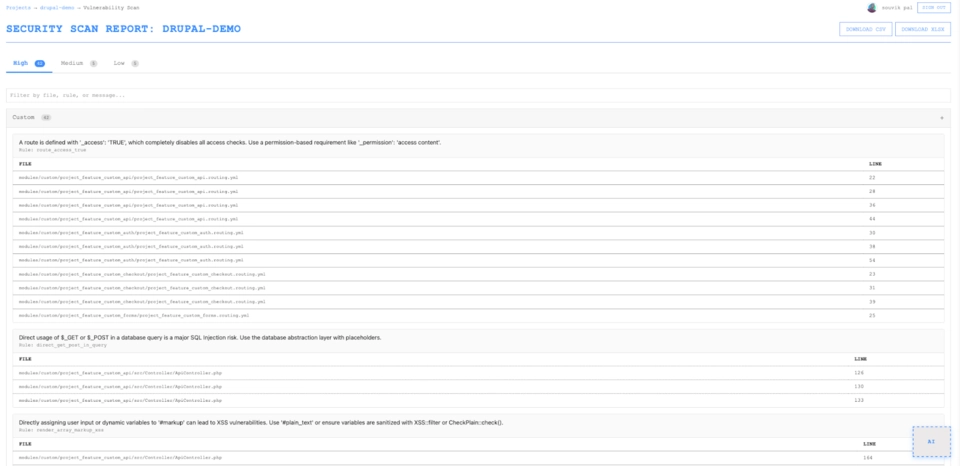
Security scanning that understands Drupal-specific patterns:
Detection categories:
- Missing XSS protection
- Unescaped Twig output
- SQL injection risks
- Insecure query construction
- Missing permission checks
- Debug mode in production
- Exposed sensitive data
Each finding includes the severity level, file location, line number, and a clear explanation of the risk.
Important caveat: Static analysis doesn't replace security audits. It supplements them. EventHorizon catches pattern-based vulnerabilities, but can't detect all security issues. Use it as part of a broader security strategy.
7. Caching analysis
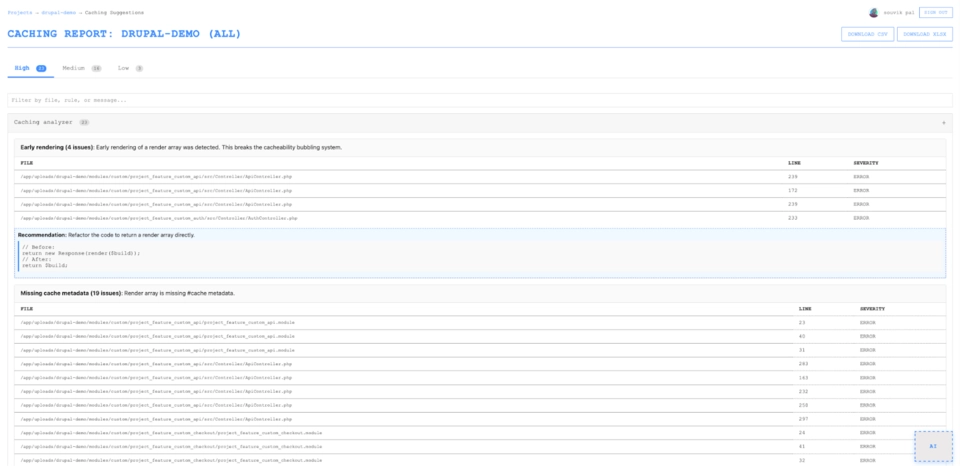
Drupal's caching system is powerful but notoriously tricky to implement correctly. EventHorizon provides context-aware caching analysis:
What it detects:
- Missing render cache metadata
- Missing cache tags
- Missing cache contexts
- Absent max-age declarations
- User-specific content without user context
- Early rendering problems
- BigPipe opportunities
The best part: Code snippets showing exactly what's wrong and recommended fixes with actual code examples.
This goes beyond "you need caching" to "here's the exact code to add, and here's why it works."
8. Configuration validation
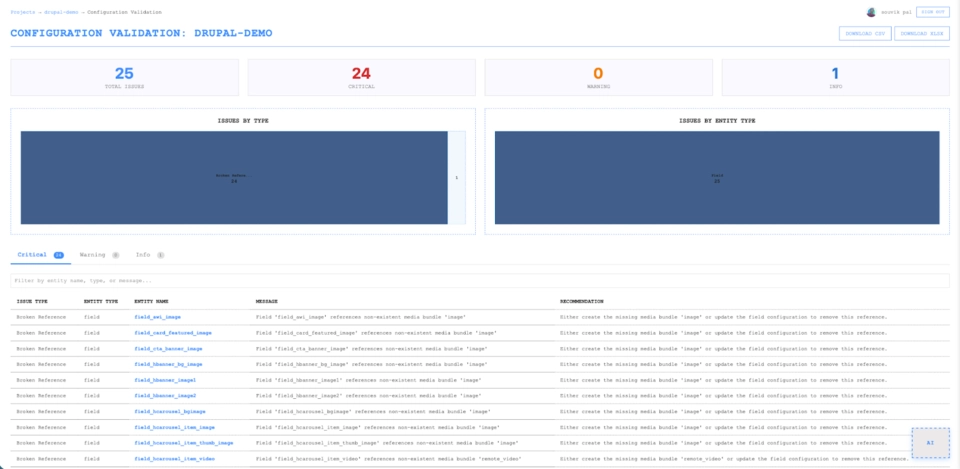
If your project includes a config sync directory, EventHorizon validates your Drupal configuration structure:
What it validates:
- Broken references: Fields pointing to non-existent content types
- Orphaned entities: Paragraphs defined but never used anywhere
- Circular dependencies: Paragraph types referencing each other in loops
- Consolidation opportunities: Duplicate structures that could be simplified
Severity levels:
- Critical: Breaks functionality (paragraph references non-existent field)
- Warning: Causes confusion/inefficiency (orphaned paragraph consuming resources)
- Info: Optimisation opportunity (missing field descriptions)
This is incredibly valuable for sites with complex content models. I've found orphaned paragraph types sitting in configs for years, consuming memory and confusing content editors.
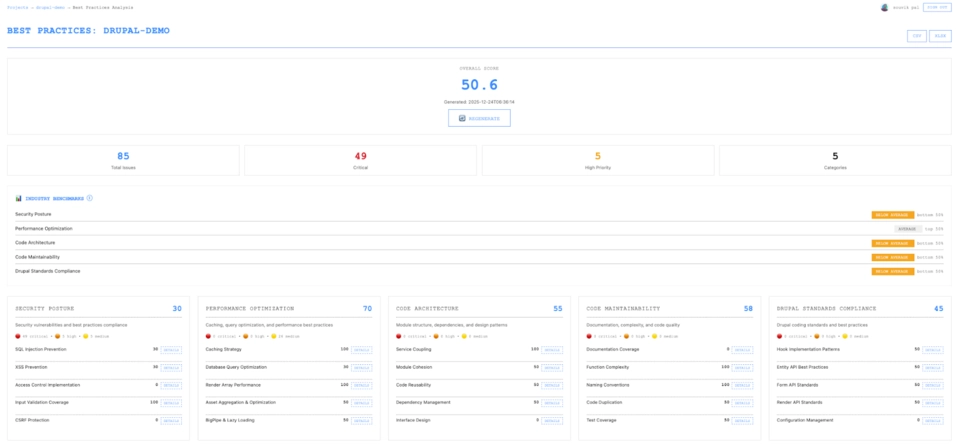
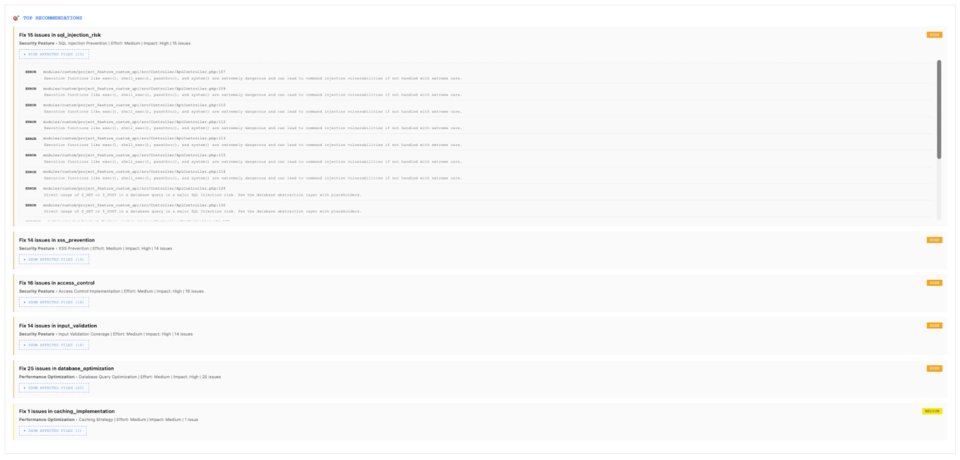
9. Best practices analysis

Evaluation of your codebase against Drupal coding standards:
5 Core categories:
- Code organisation & structure: Namespace usage, service container implementation, plugin architecture
- Security best practices: Input sanitisation, output escaping, and access control
- Performance optimisation: Render caching, query efficiency, static caching
- Code Quality & maintainability: Documentation, complexity, naming conventions
- Drupal API usage: Proper APIs, deprecated functions, and hook standards
Each category gets a 0-100 score with specific recommendations that include:
- Exact file paths and line numbers
- Code examples from your actual codebase (not generic advice)
- Priority and effort estimation
10. AI Chat assistant (RAG-Powered)
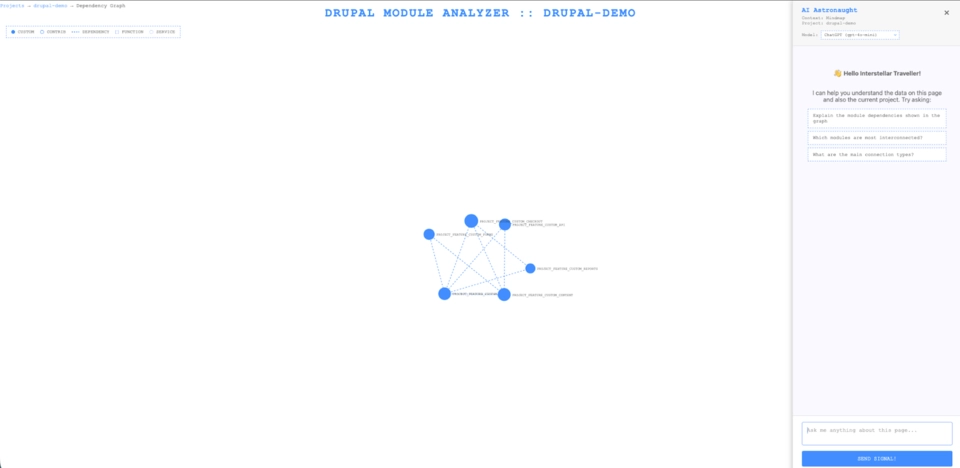
This is where EventHorizon goes from useful to indispensable.
The AI chat assistant isn't a generic chatbot. It's a RAG (Retrieval Augmented Generation) system that has indexed your entire codebase. When you ask a question, it:
- Converts your question into a semantic embedding
- Searches the vector database for relevant code chunks
- Retrieves the most relevant functions, services, and configurations
- Generates an answer using that specific context
Example questions you can ask:
- "What functions handle user authentication in this project?"
- "How is field_user_profile used in custom code?"
- "What are the high-severity performance issues?"
- "Explain the dependencies for the checkout module"
- "What hook implementations exist for form alterations?"
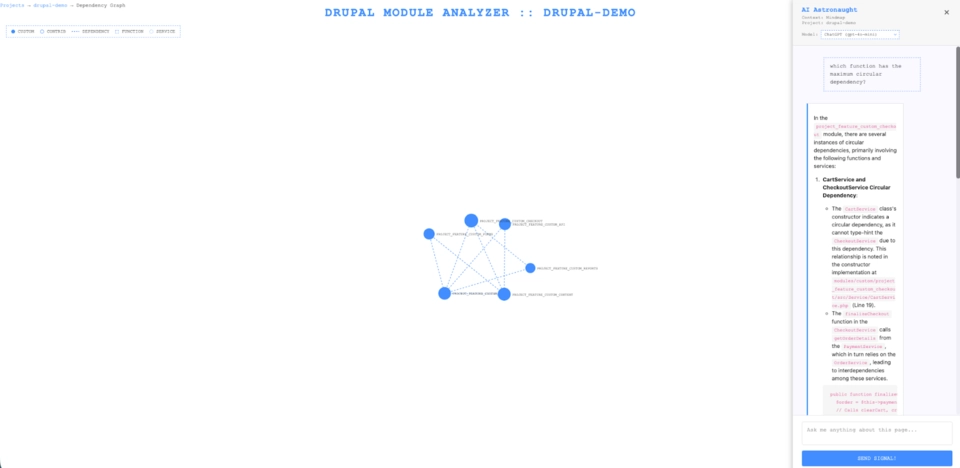
The responses include source attribution, so you can verify the information and click through to the actual code.
Multi-LLM support:
- Google Gemini (fast, cost-effective)
- OpenAI GPT-4 (high quality)
- Anthropic Claude (excellent reasoning)
- Ollama (free, local, no API required)
11. Settings & management
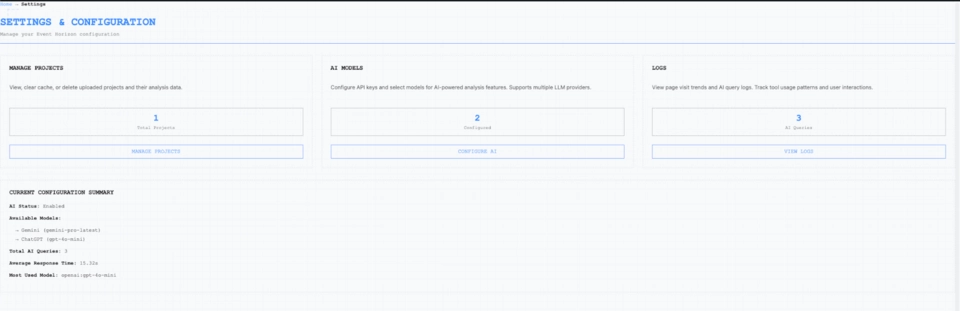
The settings page handles:
Project management:
- Add/remove projects
- Clear all data
AI model configuration:
- Configure API keys for different providers
- Select preferred models
- Test different models for quality comparison
Usage logs:
- Track which analysis pages are most used
- View AI query history with response times
- Export logs for analysis
- Monitor team usage patterns
The RAG implementation: why semantic chunking matters
I want to talk about the RAG (Retrieval Augmented Generation) implementation because it's not just a technical detail. It's why the AI chat actually works.
The problem with naive chunking
Most vector databases split text into fixed-size chunks. 512 tokens per chunk, regardless of what's in them. This works fine for prose, but absolutely destroys code.
Imagine splitting a PHP function right in the middle of a conditional block. Now your vector database has two chunks that each contain half a function. When you ask about that function, you might retrieve the first half but miss the second. Or worse, you get partial code that doesn't even parse.
EventHorizon's Semantic entity-based chunking
Instead of arbitrary text splitting, EventHorizon chunks code by semantic entities:
| Chunk Type | Granularity | What's Included |
|---|---|---|
| Function | 1 function = 1 chunk | Complete code, docblock, metadata, caller/callee relationships |
| Service | 1 service = 1 chunk | Class definition, dependencies, public methods |
| Module | 1 module = 1 chunk | Metadata, function count, service count, connections |
| Field | 1 field = 1 chunk | Configuration, usage locations, code snippets where it’s accessed |
| Content Type | 1 content type = 1 chunk | All fields, view modes, form displays |
| Paragraph | 1 paragraph = 1 chunk | Fields, usage locations |
| Finding | Issue group = 1 chunk | Performance and security findings with context |
Code integrity preservation
Functions are extracted using a bracket-matching algorithm that ensures complete code extraction:
def extract_function_body(file_path, function_name, line_number):
    brace_count = 0
    for line in code_lines:
        for char in line:
            if char == '{':
                brace_count += 1
            elif char == '}':
                brace_count -= 1
        # Function complete when all braces closed
        if brace_count == 0:
            break
    return complete_code
No broken functions. No orphaned closing braces. No split conditionals.
Why this approach?
- Semantic Coherence: Each chunk is a complete, meaningful unit
- No Partial Code: Functions and services are never split mid-implementation
- Contextual Richness: Includes metadata, relationships, and actual code
- Query Precision: When you ask about a function, you get the whole function
- Drupal-Specific: Aligns with Drupal's architecture (hooks, services, config entities)
The embedding model (all-MiniLM-L6-v2) is lightweight and fast, indexing 1000+ functions in seconds. ChromaDB provides persistent storage with hybrid search capabilities.
Who benefits from EventHorizon?
For developers
- Faster onboarding: Understand a new codebase in hours, not weeks
- Confidence in changes: See exactly what depends on what before you refactor
- Pattern discovery: Learn how existing code handles similar problems
- AI assistance: Ask questions about the code and get project-specific answers
For tech leads & architects
- Objective metrics: Health scores and coupling metrics replace gut feelings
- Visual communication: Show architecture to stakeholders without whiteboard gymnastics
- Technical debt quantification: "We have 12 high-severity circular dependencies affecting 3 custom modules"
- Sprint planning: Prioritise issues based on severity and module criticality
For presales & business teams
- Client presentations: Visual health scores and treemaps that non-technical people understand
- Risk communication: "Current codebase has a security health score of 72. Here's what needs attention."
- Budget justification: "Resolving these 15 security issues requires approximately X developer-days"
- Progress tracking: Compare scores over time to demonstrate improvement
For QA teams
- Test prioritisation: Focus on high-risk modules with the most issues
- Coverage planning: Identify tightly coupled code requiring integration tests
- Regression targets: Know which modules are most likely to break others
For DevOps
- Performance insights: Identify bottlenecks before they hit production
- Cache optimisation: Understand caching requirements for infrastructure planning
- Resource planning: Complexity scores help estimate deployment requirements
The time savings are real
Let me put some rough numbers on this.
Traditional code analysis:
- Manual dependency mapping: 8-16 hours
- Performance audit: 4-8 hours
- Security review: 8-16 hours
- Configuration validation: 2-4 hours
- Documentation: 4-8 hours
- Total: 26-52 hours (and likely incomplete)
With EventHorizon:
- Upload project: 30 seconds
- Wait for analysis: 2-5 minutes (depends on project size)
- Review dashboard and reports: 1-2 hours
- Generate exports for stakeholders: 5 minutes
- Total: ~2 hours (comprehensive, repeatable)
That's not an exaggeration. That's the difference between a week of work and a few hours in the morning.
The bigger picture
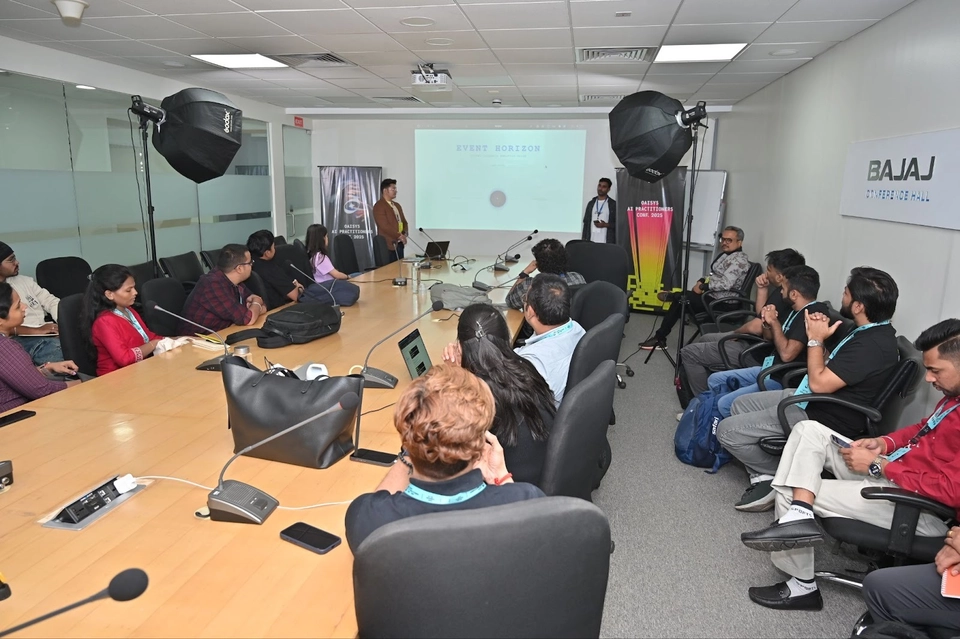
I didn't build EventHorizon because I wanted another side project. I built it because I was tired of the friction.
Tired of spending days understanding code that should have been documented. Tired of missing vulnerabilities because manual review doesn't scale. Tired of explaining architecture with hand-waving and hoping people understood.
Every Drupal developer, architect, and project manager I've talked to has the same stories. The inherited project has no documentation. The security audit found issues in year-old code. The refactoring that broke everything because nobody realised how interconnected things were.
All of this friction comes from not seeing the full picture.
EventHorizon gives you that picture.
EventHorizon won't write your code for you. But it will help you understand the code you're working with. And that understanding is the foundation of every good decision you'll make as a developer.
Transform your Drupal codebase from complexity to clarity.
Built with nearly 9 years of Drupal experience and countless hours of "I wish this tool existed."
Written by
Souvik PalSenior Engineer - Backend
EditorAnanya RakhechaTech Advocate